Upscaling
Sharper upscaling with AMD FSR 1, plus a finer render-scale setting.
- Version
- Version 0.1.0
- Works with
- SimplePlanes 2 0.7.9
- Updated
- Category
- Graphics & performance
- Online
- Local onlyExperimental: still has bugs in multiplayer
- Needs
- BepInEx 5. The Gravy Mod Menu is recommended.
What it does
Better image quality at a lower render resolution in SimplePlanes 2. The game runs on Unity 6's Universal Render Pipeline, which has AMD FSR 1 built in, but the game upscales with plain bilinear. This mod switches FSR 1 on, ties it to the game's Resolution Scale setting (or a finer render-scale slider of its own) and shows what is actually running.
Features
- Upscaler choice: FSR 1, plain Bilinear or Point (for comparison), or Game default.
- Fallback, so the picture never breaks: if FSR 1 can't run on your graphics card, the game's default is used. The log has one line saying why, and so does the status.
- Render scale:
- By default the game's own Resolution Scale setting (Settings > Display) is used.
- Override Render Scale gives a 50–100% slider in 1% steps, so 67% and 77% are possible. The game's setting is kept and comes back when the override is switched off.
- FSR 1 sharpness slider.
- Keeps your anti-aliasing: SMAA, FXAA, MSAA or Graphics Plus's TAA run at the internal resolution, then FSR 1 upscales and sharpens the result.
- Restores cleanly: every value is put back to what was underneath (the game's, or another mod's) when you switch an option off.
- Rendering only (see Multiplayer below).
Usage
Show usageHide usage
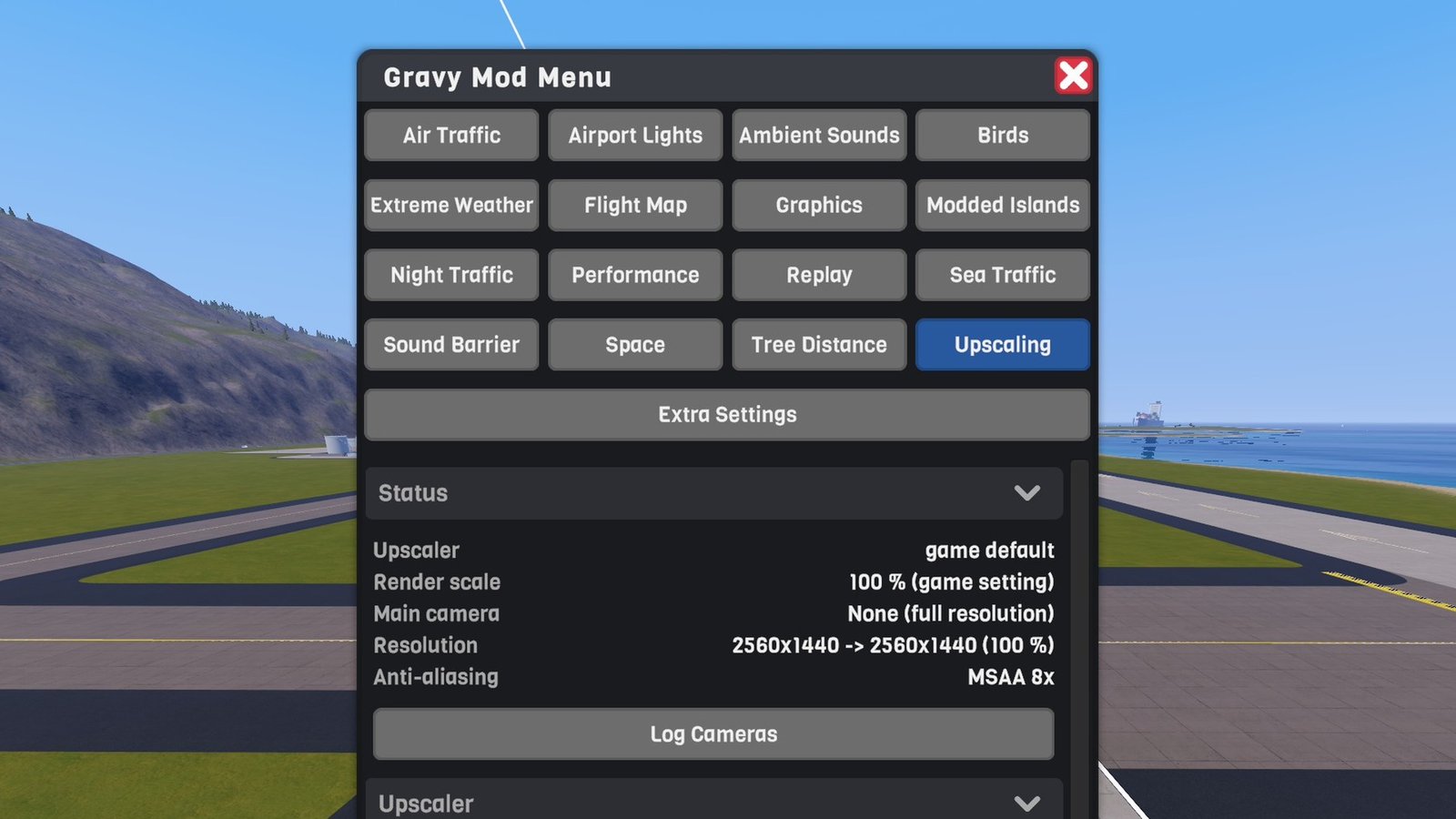
Settings and the live status are in the Gravy Mod Menu (Upscaling tab) if that mod is installed. Without it, edit BepInEx/config/rygar.sp2.upscaling.cfg. Changes apply immediately.
 (open larger)
Status rows:
- Upscaler: what's in effect. Fallback reason: why it isn't what you chose.
- Render scale: the value, and whether it's this mod's, the game's or another mod's.
- Main camera: what upscales the flight camera right now.
- Resolution: internal → screen resolution.
- Anti-aliasing: what anti-aliases the picture.
Buttons:
- Log Cameras: writes one line per camera to the BepInEx log: its size, post-processing, anti-aliasing, target and what upscales it now.
Multiplayer
Show multiplayerHide multiplayer
Experimental online. This mod runs in multiplayer, but it still has bugs there that aren't fixed yet. It works best in single player for now.
Local only. Rendering only: nothing changes for other players, they don't need the mod, and it works the same whether you host or join.
Settings
Show all settingsHide settings
| Section | Setting | Default | Notes |
|---|---|---|---|
| Upscaler | Upscaler | FSR1 | GameDefault / FSR1 / Bilinear / Point |
| Upscaler | OverrideRenderScale | false | Off = the game's Resolution Scale |
| Upscaler | RenderScale | 77% | 50–100%, used when the override is on. Above 95% renders at 100% (Unity rounds) |
| Upscaler | FsrSharpness | 92% | FSR 1 sharpening |
Working with the other Gravy mods
Show working with the other Gravy modsHide working with the other Gravy mods
Performance: its render-scale cap and FSR option set the same URP values. This mod applies after it:
- with Override Render Scale off, Performance's cap still sets the render scale and this mod's upscaler is used on it;
- with the override on, this mod's render scale wins;
- with Upscaler set to GameDefault, Performance's FSR option works as before.
Switching an option here off hands the value back to Performance.
- Graphics Plus: its TAA runs at the internal resolution, and FSR 1 upscales and sharpens the result.
Known limitations
Show known limitationsHide known limitations
- FSR 1 is a spatial upscaler: it sharpens the picture but can't add detail that the lower resolution didn't render.
- Render scale and the upscaler are global in Unity: every camera renders at the same scale.
- The user interface always renders at full resolution.
- In VR, the mod leaves everything to the game.
Requirements
Show requirementsHide requirements
- SimplePlanes 2 0.7.9 (Unity 6000.3)
- BepInEx 5 (5.4.x, x64 Mono build) installed in the game folder. On Linux/Steam Deck with Proton, add
WINEDLLOVERRIDES="winhttp=n,b" %command%to the game's launch options.
The Gravy Mod Menu is recommended: most mods keep their in-game settings and status there. Without it, edit the .cfg files in BepInEx/config/.