Sound Barrier
A vapor cone around Mach 1 and a sonic boom when jets pass you.
- Version
- Version 0.2.2
- Works with
- SimplePlanes 2 0.7.9
- Updated
- Category
- Sound
- Online
- Local onlyExperimental: still has bugs in multiplayer
- Needs
- BepInEx 5. The Gravy Mod Menu is recommended.
What it does
Brings back the vapor cone from SimplePlanes 1 and adds a sonic boom. Fly close to Mach 1 and a cloud of condensation forms around your craft. Push through, and you hear the boom. When another craft flies past you supersonic, its boom hits you as the shock cone sweeps over.
Features
- Vapor cone. It appears around any craft between about Mach 0.9 and 1.15 and is strongest right at Mach 1.
- It is a soft, streaky shell with puffs of vapor around its edge, and it fades in and out smoothly.
- It is thickest below about 2 km and thinner higher up: about half strength at 12 km. There's none above the atmosphere.
- It is sized to the craft and follows the airflow.
- Your own boom. When your craft goes through Mach 1, the boom plays in chase view. In cockpit view you get a muffled version.
- Sonic boom. A boom plays when a supersonic craft's shock cone (its Mach cone) passes the camera.
- This covers AI crafts, other players' crafts, and your own craft seen from a fly-by or free camera.
- It comes from the craft's direction and gets quieter and duller with distance.
- If a craft goes supersonic with you behind it, the boom arrives after the sound's travel time.
- Works with AI and multiplayer crafts within a set distance.
- Cooldowns keep booms from repeating while a craft hovers around Mach 1.
- Visual and audio only, and only on your machine (see Multiplayer below).
 (open larger)
Usage
Show usageHide usage
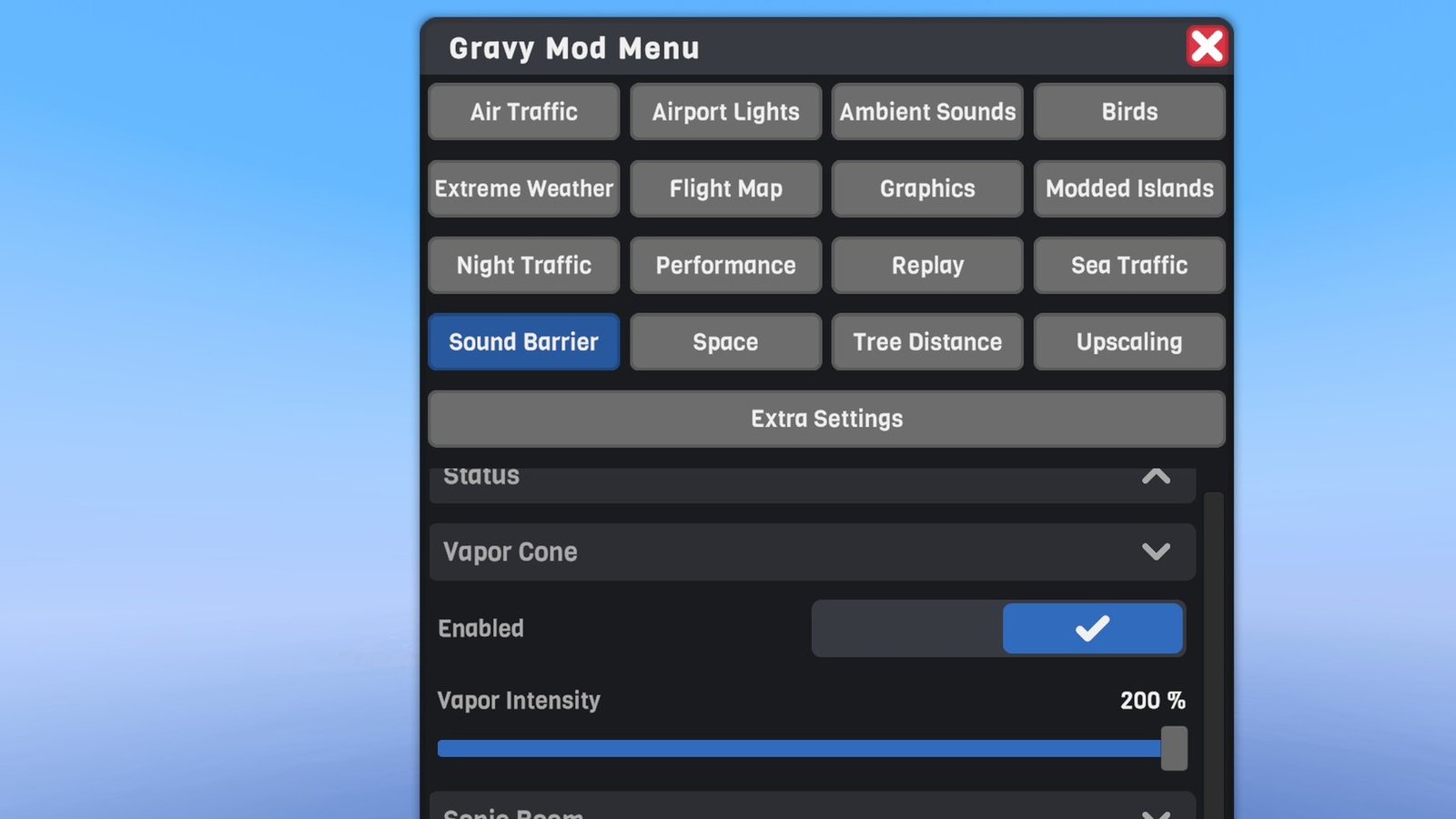
Settings live in the Gravy Mod Menu (Sound Barrier tab) if that mod is installed. It shows:
- live status: your craft's Mach number, the speed of sound at your altitude, and the current vapor cone strength;
- whether the boom sound loaded;
- a Test Boom button, which plays the boom at your volume setting;
- every setting below.
Without it, edit the .cfg file.
 (open larger)
Multiplayer
Show multiplayerHide multiplayer
Experimental online. This mod runs in multiplayer, but it still has bugs there that aren't fixed yet. It works best in single player for now.
Local only. The vapor cones and booms are only seen and heard on your computer, also for other players' jets. Nothing is sent over the network, physics and crafts aren't touched, and other players don't need the mod (players who have it get their own cones and booms, including from your jet).
Settings
Show all settingsHide settings
| Section | Setting | Default | Notes |
|---|---|---|---|
| Vapor Cone | Enabled | true | Show vapor cones |
| Vapor Cone | Intensity | 1.0 | Thickness of the cone (0–2) |
| Sonic Boom | Enabled | true | Play booms and the onboard thump |
| Sonic Boom | Volume | 1.5 | Boom volume (0–3). Above 100% the sound is amplified with a soft limiter |
| Sonic Boom | CockpitThump | true | Muffled boom in cockpit view (off: full boom) |
| Other Crafts | ApplyToOtherCrafts | true | Vapor cones and booms for AI and other players' crafts |
| Other Crafts | MaxDistanceKm | 5 | Other crafts only within this distance of the camera (0.5–20 km) |
| Debug | AlwaysShowVapor | false | Always show your own craft's vapor cone (for testing the look) |
| Debug | MachLog | false | Log Mach number and vapor strength every few seconds above Mach 0.8 |
Known limitations
Show known limitationsHide known limitations
- Speed is measured against the ground, like the game's own Mach number, so wind isn't counted.
- Humidity is estimated from altitude only. The current weather isn't taken into account.
- The boom is an approximation. The shock cone is a straight cone from the craft's current position and direction, so hard turns and accelerations aren't modelled exactly.
- Other players' speeds come from their position updates, so a laggy connection can make their cones flicker.
Requirements
Show requirementsHide requirements
- SimplePlanes 2 0.7.9
- BepInEx 5 (5.4.x, x64 Mono build) installed in the game folder. On Linux/Steam Deck with Proton, add
WINEDLLOVERRIDES="winhttp=n,b" %command%to the game's launch options.
The Gravy Mod Menu is recommended: most mods keep their in-game settings and status there. Without it, edit the .cfg files in BepInEx/config/.