Birds
Flocks of gulls, crows, starlings and pigeons that scatter from aircraft.
- Version
- Version 0.1.3
- Works with
- SimplePlanes 2 0.7.9
- Updated
- Category
- Weather & sky
- Online
- Local onlyExperimental: still has bugs in multiplayer
- Needs
- BepInEx 5. The Gravy Mod Menu is recommended.
What it does
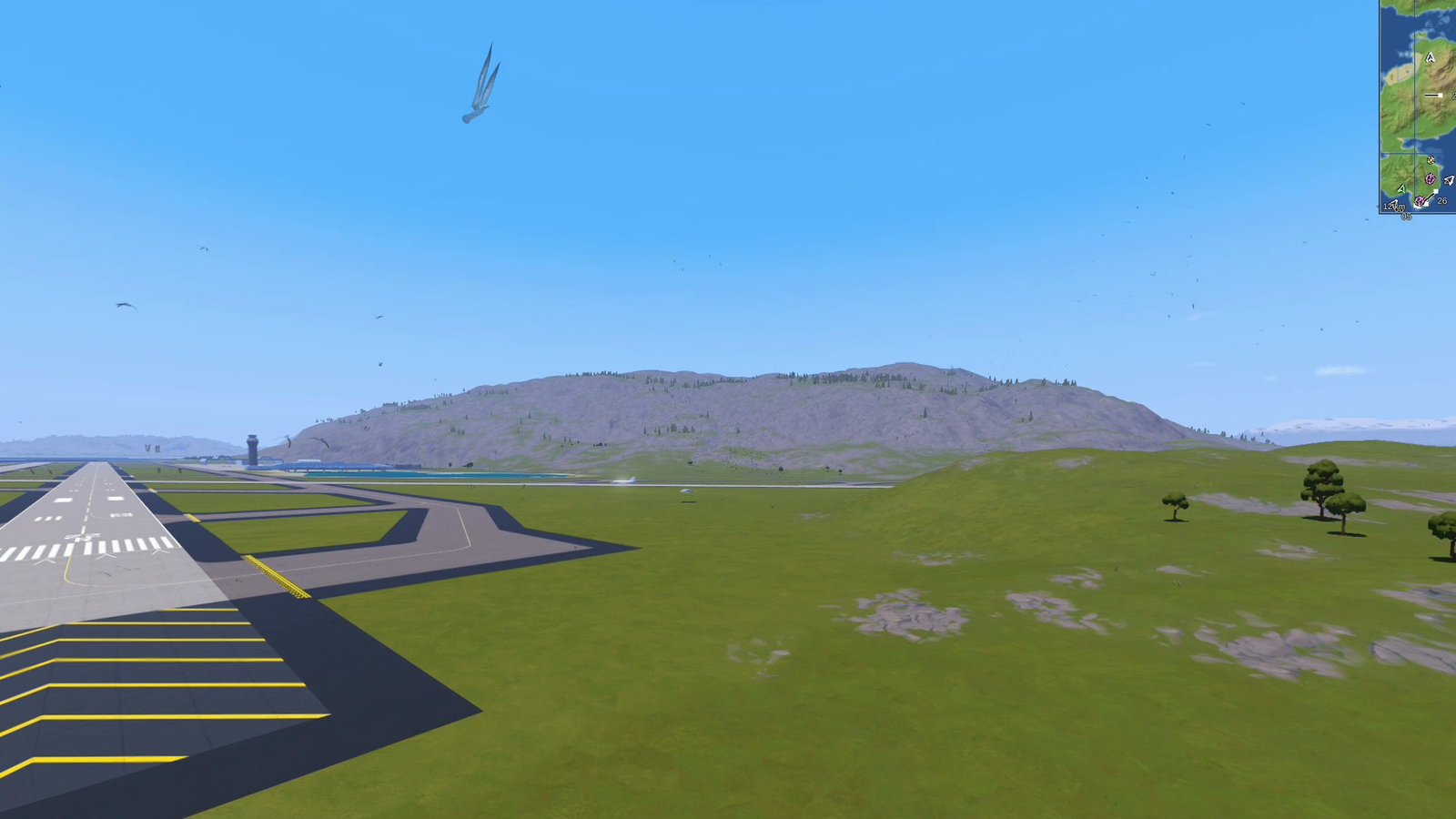
Living flocks of birds for SimplePlanes 2. The base game has a handful of gulls: a few fly perfect circles in thermals and pop back to the bottom when they reach the top, and a few more fly dead-straight lines and pop to the other side of an invisible circle. This mod replaces them with flocks that behave like birds. Gulls wheel over the beaches, harbours, cliffs and waterfronts. Crows and starling murmurations work the fields, pigeons circle the towns and buzzards ride the thermals. They flap and glide, bank into their turns, and scatter when an aircraft comes through.
 (open larger)
Features
- Flocks, not loners. Each bird follows boids-style rules: it keeps clear of its neighbours, matches their heading and stays with the flock, watching up to seven flock mates as real starlings do. On top of that comes the flock's goal: wheeling around a spot, heading somewhere, or circling up a thermal.
The right birds in the right places. Where a flock appears depends on what's below it, read from the ground itself:
Place Birds Coasts, beaches, cliffs, harbours and waterfronts gulls (most birds are here) Open sea a few gulls Fields and forests crows, and starling murmurations Towns inland pigeons and crows Thermals (the game's thermal sites) gulls near the coast, buzzards inland High mountains few birds - Birds where you'll see them. Most new flocks are placed ahead of you, where you're flying (or where you're looking, if you're standing still), so a low pass along a coast or a climb out of an airport flies you past them. Flocks you've left behind make way for new ones ahead. The higher you fly, the more flocks fly high, gulls and crows commuting a few hundred metres up, so there are still birds in view from 500 m and not only specks far below.
- Real sizes and speeds. Gulls span 1.25–1.5 m and cruise at about 12 m/s with three wingbeats a second. Starlings are 40 cm across, fly at 17 m/s and beat their wings ten times a second. Crows, pigeons and buzzards are in between.
Show the restHide the rest
- Flapping and gliding. Birds flap in bouts and glide in between: gulls glide a lot, starlings hardly at all. They always flap when climbing, slow or frightened, and finish a wingbeat before they glide. Gulls ride the updraft along cliffs. Buzzards and gulls in thermals soar with their wings still, circle up to the top of the thermal, then glide out and down to go round again, instead of teleporting.
- Natural flight. Turns are banked from the actual sideways acceleration. Each bird keeps a height band above the ground, water or rooftops below it, feels ahead for hills, cliffs and buildings, and drifts with the wind. Murmurations swirl, roll and reverse every few seconds.
- Scatter from aircraft. Birds predict where an aircraft (yours, AI or another player's) will pass in the next 2.5 seconds and dive and swerve out of its path. Each bird takes a moment to react, so a fast jet can still catch one. The flock stays agitated for a few seconds, then settles somewhere else. A free camera flying through a flock scatters it too.
- Day and night. Birds are out from about 6:00 to 19:00. At dusk the flocks drop to the ground or water and disappear there, and they come back in the morning. There are fewer in rain and none in storms.
- No popping. New flocks appear out of view or far enough away to be specks a few pixels across, and fade in over a few seconds. Distant birds shrink away smoothly before they're removed, and far birds never shrink below a minimum size (3 pixels by default), so they stay visible as specks instead of flickering.
- The game's own gull. Birds are drawn with the game's animated gull model and material, tinted darker for crows, starlings and buzzards and grey for pigeons. If that model can't be used, a simple low-poly bird with four wing poses takes its place.
- Never birdless. The game's own birds are only hidden once this mod's birds have actually been drawn on screen. If ours never show up, the game's gull model is swapped for the simple one. If neither can be drawn, or no birds of ours have been around for a minute when there should be some, the game's birds come back on their own.
- Optional bird strikes (off by default, as in the base game). With them on, a bird that hits your craft is gone in a puff of feathers and "Bird strike!" shows on screen. In Damage mode the part it hit takes damage through the game's own damage system: a gull at 80 m/s does about 16, at 150 m/s about 56 (a standard part has 100), and engines and inlets take more.
Usage
Show usageHide usage
Everything is in the Birds tab of the Gravy Mod Menu. The tab's status rows show:
- Birds: how many there are and in how many flocks, how many are in the camera's view (and how many of those are big enough to spot easily), and how many the game actually drew on screen last frame;
- Spawning: how many birds the area should have right now, how many flocks have been made so far, and how many were left behind and made way for new ones ahead;
- Test Flock: the flock from Spawn Flock Here, while it's around;
- Around You: what kind of place you are over and how bird-rich it is;
- Model: which model is being drawn, and whether it has been seen on screen yet;
- Game Birds: the game's own bird spawners nearby, and whether they are hidden or shown (and why);
- bird strikes so far, and the last one;
- CPU time per frame.
Spawn Flock Here puts a flock of a dozen gulls circling about 110 m in front of the camera, at the camera's height. They stay put and aren't scared for the first 20 seconds, even at night, so you can check that birds are drawn. After two minutes they're an ordinary flock.
Respawn Birds clears all flocks and fills the area again. If the mod had given up drawing birds, it tries again.
Birds are life-sized: a gull is about 1.4 m across, so beyond a few hundred metres it's only a few pixels. If you want them easier to spot, raise Bird Size (the game draws its own gull about 5.5 m across, which is about 400%) or Minimum Size in the Advanced section. For more birds, raise Density: 300% is three times as many, in bigger flocks.
Multiplayer
Show multiplayerHide multiplayer
Experimental online. This mod runs in multiplayer, but it still has bugs there that aren't fixed yet. It works best in single player for now.
Local only. Nothing is sent over the network, other players don't need the mod, and it works the same whether you host or join. Each player sees their own birds (or the game's own, without the mod); hiding the game's birds only happens on your screen. Bird strikes only ever check and damage your own craft; other players' crafts are never touched, only avoided by the birds.
Settings
Show all settingsHide settings
| Section | Setting | Default | Notes |
|---|---|---|---|
| Birds | Enabled | true | |
| Birds | Density | 100% | How many birds (0–300%). 100% is about 300 around you on a coast by day, about 170 over fields and towns, 120 at sea |
| Birds | BirdSize | 100% | Drawn size (50–400%). 100% is the real wingspan |
| Birds | ReplaceGameBirds | true | Hide the game's own birds once ours have been seen on screen (they come back if ours stop). Thermals keep their birds: these circle in them instead |
| Birds | BirdStrikes | Off | Off / FeathersOnly / Damage (your craft only) |
| Birds | ScatterFromAircraft | true | Birds flee aircraft and the camera |
| Advanced | BirdModel | Auto | Auto / GameModel / SimpleModel |
| Advanced | SpawnRadiusKm | 1.6 | Birds live within this distance of the camera (0.8–2.5 km) |
| Advanced | MinPixels | 3 | Smallest drawn size of distant birds, in pixels (0–6; 0 = always true size). Settings still on the old 1.5 are moved to 3 |
| Advanced | StrikeDamage | 100% | Bird strike damage multiplier |
Performance
Show performanceHide performance
- Drawing. Each bird in view is a plain mesh renderer whose mesh is swapped to the current animation frame. This is how the game draws its own birds. The renderers are pooled and reused, at most 900 at a time, and birds outside the view aren't drawn at all.
- Simulation. Each bird compares itself with at most seven flock mates per frame. Flocks more than 500 m from you are updated every second frame, past 1 km every third; that far out a bird moves less than a pixel in between. Ground and obstacle rays are spread over the birds, twelve per frame. Spotting where flocks belong takes a few rays a few times a second.
- Range. Birds only exist within the bird radius of the camera. None spawn when the camera is more than 1.5 km above the ground.
Known limitations
Show known limitationsHide known limitations
- The game's gull model is read when a flight starts. If the game changes how it stores the bird, the simple model is used (the log says why).
- A minute into each flight the log gets a one-line summary (bird counts, target, time of day, height above the ground, spawn tries, model, game birds), and every minute a short line: how many birds were in view on average, the most at once, how often at least one was in view, how many were easy to spot, where the flocks are, and the CPU time. Include them when reporting a problem.
- Places are read from the ground below with raycasts, so a forest with tree colliders can count as a "town" (pigeons over the trees), and terrain that isn't loaded yet counts as water.
- The simple model is unlit and follows the time of day, so in heavy overcast it can look a little bright.
- Birds don't land, walk or float on the water: at dusk they drop down and fade out.
- Bird calls aren't part of this mod.
Requirements
Show requirementsHide requirements
- SimplePlanes 2 0.7.9
- BepInEx 5 (5.4.x, x64 Mono build) installed in the game folder. On Linux/Steam Deck with Proton, add
WINEDLLOVERRIDES="winhttp=n,b" %command%to the game's launch options. - Optional: the Gravy Mod Menu, for the in-game settings tab.
The Gravy Mod Menu is recommended: most mods keep their in-game settings and status there. Without it, edit the .cfg files in BepInEx/config/.